← Paper libraryChoose A4 paper in print settings.
Name: _________________________   Section: __________   Date: __________
1. Which tool adds words to a drawing?
○ A. Eraser
○ B. Text tool
○ C. Fill tool
○ D. Scroll wheel
Drawing tools
2. Which action selects an item on the screen?
○ A. Pouring water on the mouse
○ B. A single click
○ C. Pulling the monitor cable
○ D. Hitting the keyboard hard
Using a mouse
3. Which long key adds a blank space between words?
○ A. Caps Lock
○ B. Backspace
○ C. Escape
○ D. Spacebar
Keyboard
4. Which part is marked B in the computer diagram?
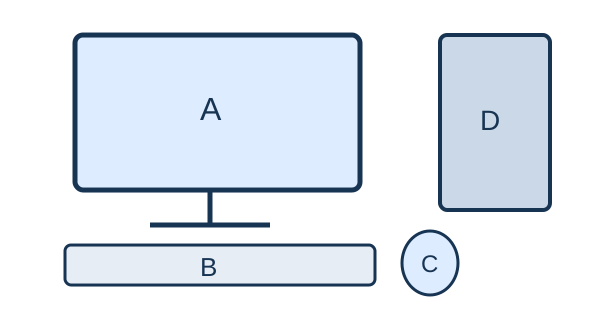
Question diagram
○ A. Monitor
○ B. Keyboard
○ C. CPU box
○ D. Mouse
Computer parts
Name: _________________________   Section: __________   Date: __________
5. Which key adds a space between words?
○ A. Spacebar
○ B. Escape
○ C. Caps Lock
○ D. Backspace
Keyboard keys
6. Which posture is suitable at a computer?
○ A. Lie on the keyboard
○ B. Bend very close to the screen
○ C. Sit upright with support
○ D. Twist the neck continuously
Healthy use
7. Who should help a young child with an unknown online message?
○ A. An unknown sender
○ B. No one ever
○ C. A trusted adult
○ D. A stranger asking for a password
Digital safety
8. Which action keeps a drawing for another day?
○ A. Unplug immediately
○ B. Discard
○ C. Save
○ D. Delete
Files
Name: _________________________   Section: __________   Date: __________
9. Which part is called the brain of a computer?
○ A. Printer
○ B. Speakers
○ C. Mouse
○ D. CPU
Parts of a computer
10. Which tool fills a closed shape with colour?
○ A. Text cursor
○ B. Zoom only
○ C. Save button
○ D. Fill tool
Drawing tools
11. Why should you keep a water bottle away from a computer?
○ A. Spilled water can damage it
○ B. The monitor needs drinking water
○ C. Water helps the keyboard type
○ D. Water makes the mouse faster
Care of a computer
12. Which part is marked A in the computer diagram?
Question diagram
○ A. Monitor
○ B. Mouse
○ C. Keyboard
○ D. CPU box
Computer parts
Name: _________________________   Section: __________   Date: __________
13. Which device is used to type your name?
○ A. Speaker
○ B. Keyboard
○ C. Monitor
○ D. Printer
Input devices
14. Which hands are best for using a keyboard?
○ A. Muddy hands
○ B. Clean and dry hands
○ C. Hands covered in food
○ D. Wet hands
Computer care
15. Which part displays the work you do?
○ A. Mouse
○ B. Printer
○ C. Monitor
○ D. Keyboard
Parts of a computer
16. Holding the mouse button and moving an item is called _____.
○ A. typing
○ B. printing
○ C. charging
○ D. dragging
Mouse
Name: _________________________   Section: __________   Date: __________
17. Which device shows words instead of printing them on paper?
○ A. Keyboard
○ B. Printer
○ C. Monitor
○ D. Mouse
Computer uses
18. Which device produces a paper copy?
○ A. Printer
○ B. Keyboard
○ C. Mouse
○ D. Microphone
Output devices
19. A computer can help us with _____.
○ A. growing leaves itself
○ B. drinking water
○ C. eating food
○ D. calculations
Using computers
20. Pressing the mouse button twice quickly is a _____.
○ A. space
○ B. double-click
○ C. printout
○ D. shutdown
Mouse