← Paper libraryChoose A4 paper in print settings.
Name: _________________________   Section: __________   Date: __________
1. Which machine can play a digital story or cartoon?
○ A. Refrigerator
○ B. Hand fan
○ C. Bicycle
○ D. Computer
Computer uses
2. Which is a useful computer activity?
○ A. Pedalling the monitor
○ B. Washing clothes inside it
○ C. Pouring water inside it
○ D. Drawing a picture
Using computers
3. Which part is marked A in the computer diagram?
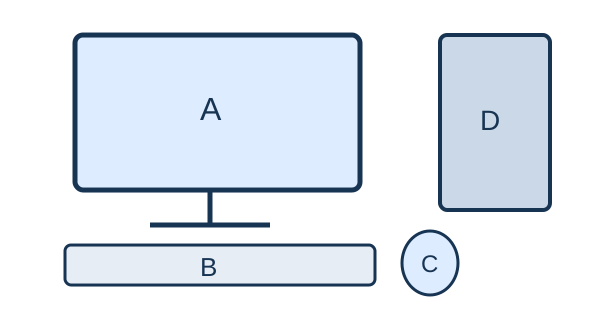
Question diagram
○ A. Monitor
○ B. Keyboard
○ C. CPU box
○ D. Mouse
Computer parts
4. Which parts help us hear computer sounds?
○ A. Mouse buttons
○ B. Keyboard keys
○ C. Speakers
○ D. Printer tray
Parts of a computer
Name: _________________________   Section: __________   Date: __________
5. What is an operating system mainly responsible for?
○ A. Only typing letters
○ B. Managing hardware and programs
○ C. Only charging a cable
○ D. Only painting the case
Operating systems
6. Which tool fills a closed shape with colour?
○ A. Fill tool
○ B. Save button
○ C. Scroll wheel
○ D. Zoom only
Drawing tools
7. Which part is marked B in the computer diagram?
Question diagram
○ A. Monitor
○ B. Mouse
○ C. Keyboard
○ D. CPU box
Computer parts
8. Which is hardware?
○ A. Drawing program
○ B. Operating system
○ C. Web browser
○ D. Mouse
Hardware and software
Name: _________________________   Section: __________   Date: __________
9. Which device can store files?
○ A. USB flash drive
○ B. Microphone stand
○ C. Speaker
○ D. Mouse pad
Storage
10. What is a folder mainly used for?
○ A. Organising files
○ B. Cooling the CPU
○ C. Producing sound
○ D. Supplying power
Files and folders
11. Pressing a mouse button once is called a _____.
○ A. printout
○ B. paragraph
○ C. folder
○ D. click
Mouse
12. Which action keeps a drawing for another day?
○ A. Delete
○ B. Save
○ C. Unplug immediately
○ D. Discard
Files
Name: _________________________   Section: __________   Date: __________
13. Which memory normally loses stored contents when power is off?
○ A. RAM
○ B. SSD
○ C. Hard disk
○ D. USB drive
Memory and storage
14. What is a web browser used for?
○ A. Printing money
○ B. Viewing web pages
○ C. Cleaning a screen
○ D. Charging a battery
Internet basics
15. Which information should be kept private online?
○ A. Password
○ B. Favourite colour only
○ C. A public story title
○ D. A weather forecast
Digital safety
16. Which key removes the character just before the cursor?
○ A. Backspace
○ B. Caps Lock
○ C. Spacebar
○ D. Shift alone
Keyboard
Name: _________________________   Section: __________   Date: __________
17. Which posture is suitable at a computer?
○ A. Lie on the keyboard
○ B. Bend very close to the screen
○ C. Twist the neck continuously
○ D. Sit upright with support
Healthy use
18. Which formatting makes text thicker and darker?
○ A. Underline
○ B. Align right
○ C. Italic
○ D. Bold
Word processing
19. A row and column meet at a _____.
○ A. folder
○ B. slide
○ C. cell
○ D. paragraph
Spreadsheets
20. Before switching off, what should you do with your work?
○ A. Throw away the mouse
○ B. Wet the screen
○ C. Save it
○ D. Close without saving every time
Computer care