← Paper libraryChoose A4 paper in print settings.
Name: _________________________   Section: __________   Date: __________
1. Which long key adds a blank space between words?
○ A. Caps Lock
○ B. Backspace
○ C. Escape
○ D. Spacebar
Keyboard
2. Which part moves the pointer?
○ A. Printer
○ B. Speaker
○ C. Monitor stand
○ D. Mouse
Parts of a computer
3. What does a computer network connect?
○ A. Devices that can exchange data
○ B. Only chairs
○ C. Only batteries
○ D. Only walls
Networks
4. Which hands are best for using a keyboard?
○ A. Muddy hands
○ B. Wet hands
○ C. Clean and dry hands
○ D. Hands covered in food
Computer care
Name: _________________________   Section: __________   Date: __________
5. Which part is marked B in the computer diagram?
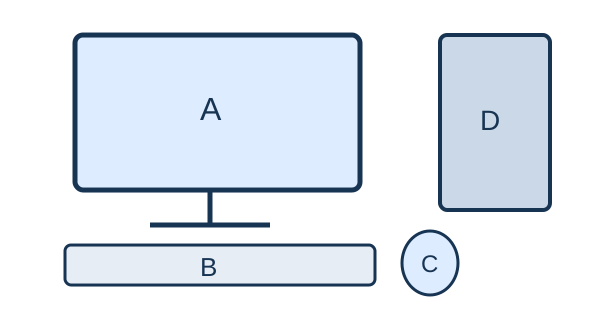
Question diagram
○ A. Mouse
○ B. CPU box
○ C. Monitor
○ D. Keyboard
Computer parts
6. What is an algorithm?
○ A. A kind of monitor
○ B. A music file only
○ C. A finite sequence of steps to solve a problem
○ D. A power cable
Algorithms
7. Which device shows words instead of printing them on paper?
○ A. Keyboard
○ B. Monitor
○ C. Printer
○ D. Mouse
Computer uses
8. What is a folder mainly used for?
○ A. Cooling the CPU
○ B. Organising files
○ C. Producing sound
○ D. Supplying power
Files and folders
Name: _________________________   Section: __________   Date: __________
9. Which memory normally loses stored contents when power is off?
○ A. SSD
○ B. Hard disk
○ C. USB drive
○ D. RAM
Memory and storage
10. Which spreadsheet address names column B, row 3?
○ A. 3B
○ B. 33
○ C. BB
○ D. B3
Spreadsheets
11. Which part is marked A in the computer diagram?
Question diagram
○ A. Mouse
○ B. Monitor
○ C. Keyboard
○ D. CPU box
Computer parts
12. Which tool adds words to a drawing?
○ A. Scroll wheel
○ B. Text tool
○ C. Fill tool
○ D. Eraser
Drawing tools
Name: _________________________   Section: __________   Date: __________
13. Holding the mouse button and moving an item is called _____.
○ A. dragging
○ B. typing
○ C. charging
○ D. printing
Mouse
14. Which is hardware?
○ A. Drawing program
○ B. Keyboard
○ C. Operating system
○ D. Web browser
Hardware and software
15. Which formatting makes text thicker and darker?
○ A. Align right
○ B. Italic
○ C. Underline
○ D. Bold
Word processing
16. Who should help a young child with an unknown online message?
○ A. No one ever
○ B. A stranger asking for a password
○ C. An unknown sender
○ D. A trusted adult
Digital safety
Name: _________________________   Section: __________   Date: __________
17. Which posture is suitable at a computer?
○ A. Sit upright with support
○ B. Lie on the keyboard
○ C. Twist the neck continuously
○ D. Bend very close to the screen
Healthy use
18. Which is the strongest password of these?
○ A. R7!mQ2#vL9
○ B. 12345678
○ C. password
○ D. aaaaaaaa
Cyber safety
19. Which action keeps a drawing for another day?
○ A. Discard
○ B. Save
○ C. Unplug immediately
○ D. Delete
Files
20. Which can be kept as computer data?
○ A. A living plant
○ B. A cup of milk
○ C. A wet cloth
○ D. A typed story
Using computers